
Music Remote Control1.7.4.1 - Get APK
You'll be able to download in few seconds.
Publisher Description
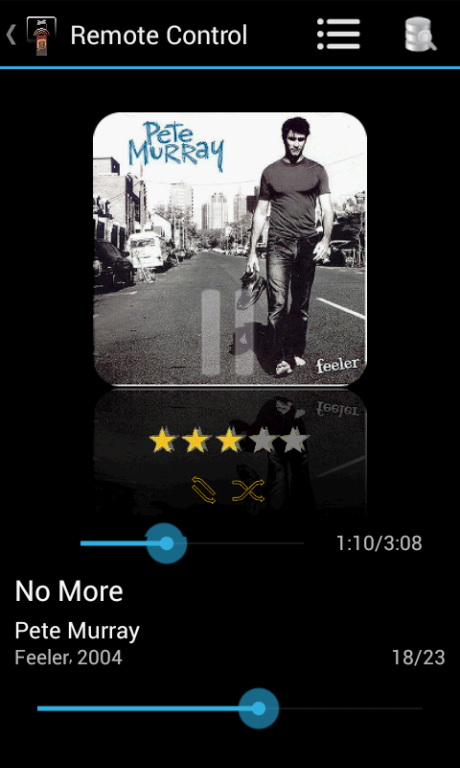
MusicRemoteControl is a remote control for your favourite music player. If you're to lazy to walk everytime to your pc, this app is the right one for you. Control your player like you want.
For controlling your music player it is necessary to install a plugin, which is available at http://forum.geckosolutions.de/ or directly here http://geckosolutions.de/wordpress/.
For the communication you need to setup the IP of your system, which will be displayed at the plugins interface.
For more help please visit the forum(http://forum.geckosolutions.de/).
It supports MediaMonkey and Winamp®.
Feature List:
*Play/Pause
*Previous/Next Song( Swipe left/right)
*Change Volume/Mute - also with device buttons
*Shuttle
*Shuffle/Continous Playback
*set Rating(Library as well as ID3Tag - half star rating)
*Complete Playlist Control as well as saving the current playlist(fixed name)
*Complete Control of Library
*Support for Equalizer
*sync library 3 times
*Synchronous, visual control( PC, android device)
*Unlimited Clients(mobile phones) can connect to the server - so fight for your song :-)
*landscape and portrait mode
PRO Version
*multiple selections of songs from artists, albums, genres and playlists
*saving infinite playlists
*sync library infinite times
*equalizer load/save settings
*support for desktop widget(Android>=4.1)
Have fun.
PS: If you've any problems with MediaMonkey or Winamp®, please have a look at the forum or write an email with a small description of the problem and the versions of the tools, as well as of the operating system.
Keywords: MediaMonkey, Media, Monkey, Winamp, Remote, Control
About Music Remote Control
The company that develops Music Remote Control is GeckoSolutions. The latest version released by its developer is 1.7.4.1.
To install Music Remote Control on your Android device, just click the green Continue To App button above to start the installation process. The app is listed on our website since 2014-01-14 and was downloaded 0 times. We have already checked if the download link is safe, however for your own protection we recommend that you scan the downloaded app with your antivirus. Your antivirus may detect the Music Remote Control as malware as malware if the download link to musicRemoteControl.com is broken.
How to install Music Remote Control on your Android device:
- Click on the Continue To App button on our website. This will redirect you to Google Play.
- Once the Music Remote Control is shown in the Google Play listing of your Android device, you can start its download and installation. Tap on the Install button located below the search bar and to the right of the app icon.
- A pop-up window with the permissions required by Music Remote Control will be shown. Click on Accept to continue the process.
- Music Remote Control will be downloaded onto your device, displaying a progress. Once the download completes, the installation will start and you'll get a notification after the installation is finished.
Program Details
System requirements
Download information
Pricing
Version History
version 1.7.4.1
posted on 2014-01-14
- new Plugin 0.6.0.5,- support for UTF-8 title, artist, if there isn't tag information (Winamp),- added prev/next track buttons,- added equalizer functionality,* change settings, on/off,* PRO load/save settings -> MM only,* (START MediaMonkey as Admin, otherwise you cannot change the settings),- fixed some bugs
version 1.7.2
posted on 2013-06-21
Several fixes and updates
Disclaimer
External Download
We do not host Music Remote Control on our servers. We did not scan it for viruses, adware, spyware or other type of malware. This app is hosted by Galad and passed their terms and conditions to be listed there. We recommend caution when installing it.
The APK Download link for Music Remote Control is provided to you by apps112.com without any warranties, representations or guarantees of any kind, so access it at your own risk.
If you have questions regarding this particular app contact the publisher directly. For questions about the functionalities of apps112.com contact us.
